Turn-In BBQ

Harvest Smoke-Off · KCBS

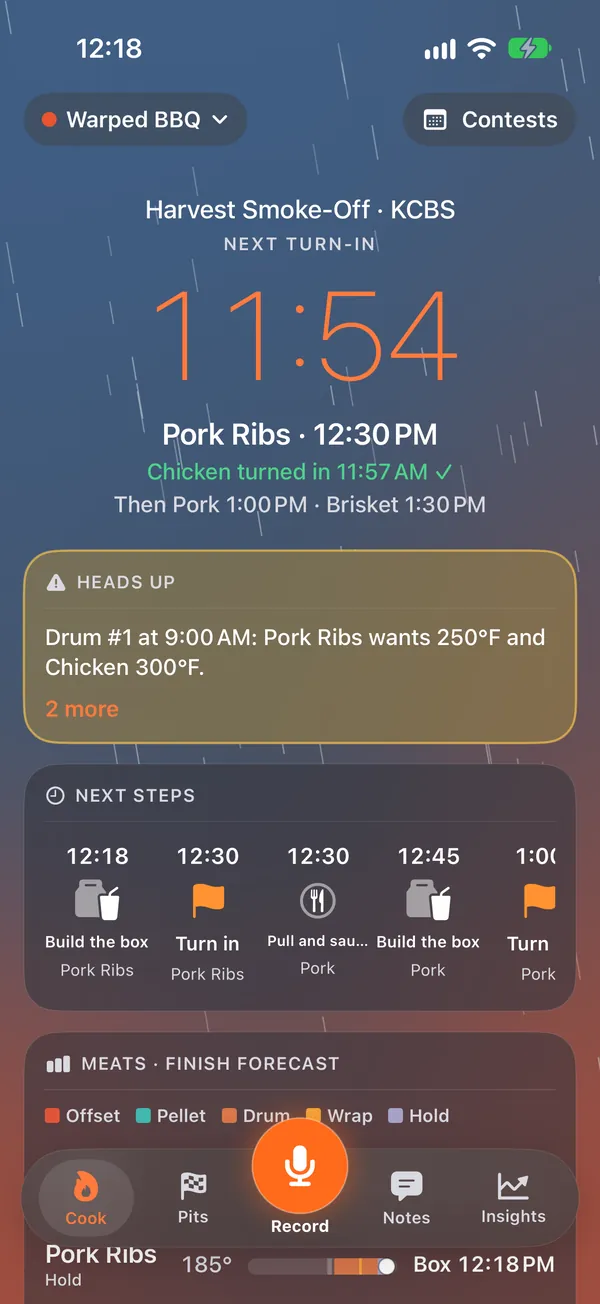
Next turn-in

Chicken · 12:00 PM

Then Pork Ribs 12:30 PM · Pork 1:00 PM · Brisket 1:30 PM

Plan the cook back from turn-in.

Turn-In BBQ is the cook planner for competition barbecue teams. It builds every meat's steps backwards from its box, forecasts each finish as the cook goes, keeps the whole team's notes in one feed you can talk to, and remembers what actually scored.

Coming soon to theApp Store Download on theApp Store See what it does

iPhone and iPad. Your first 2 contests are free; then Solo $49.99 a year or Team $79.99 a year.

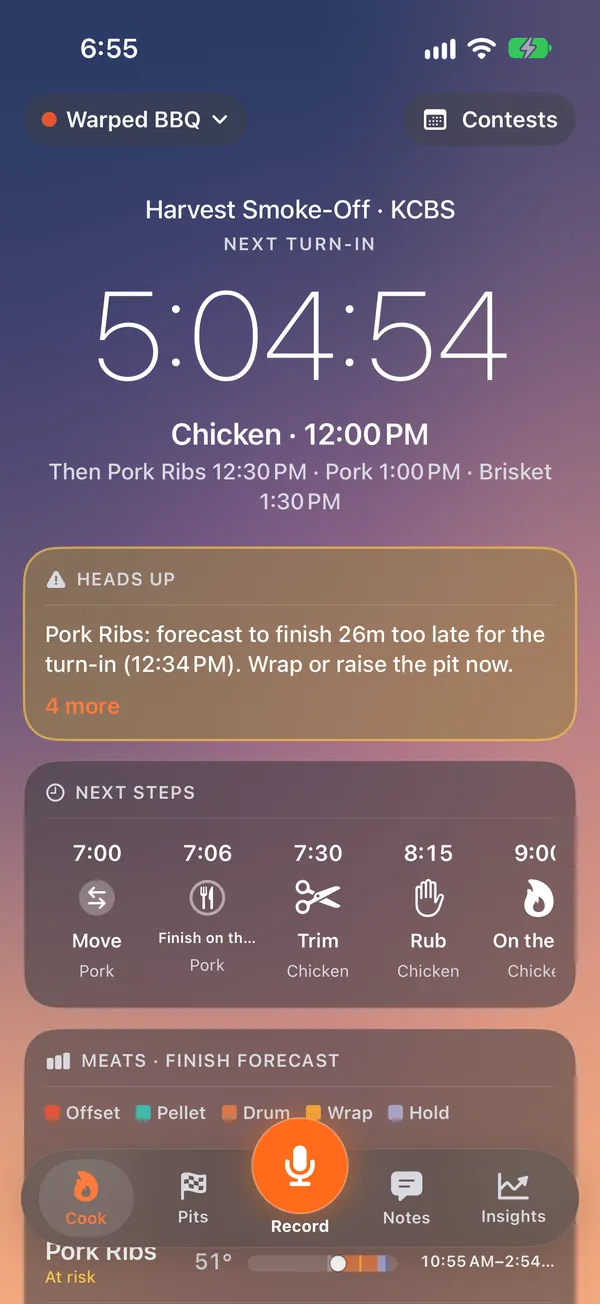
Cook Day at sunrise: a countdown of 5:04:54 to the chicken turn-in at 12:00 PM, a heads-up that the pork ribs will finish 26 minutes late, and the next steps

Built for contest day

Everything here is for teams who cook to a turn-in window: KCBS (Master Series and Backyard), CBA, IBCA, MBN and SCA, each with its categories, turn-ins and scoring built in.

The plan

Work back from the box

Pick the contest and its sanctioning body, and every meat gets a lane built backwards from its turn-in: trim, inject, rub, on, wrap, pull, hold, box. Overnight steps read like a schedule ("Day before · 5:00 PM"); the last ones count down to the minute.

  • The cooks' meeting moved a turn-in? Its steps move with it, and the hold soaks up the difference.
  • Three alarms for every turn-in (window open, 15 minutes, last call) that sound even on silent or in a Focus (iOS 26; time-sensitive notifications before that).
  • Pits are equipment: two temperatures on one drum, or a pit that's full, shows up before it bites, with the fix one tap away.
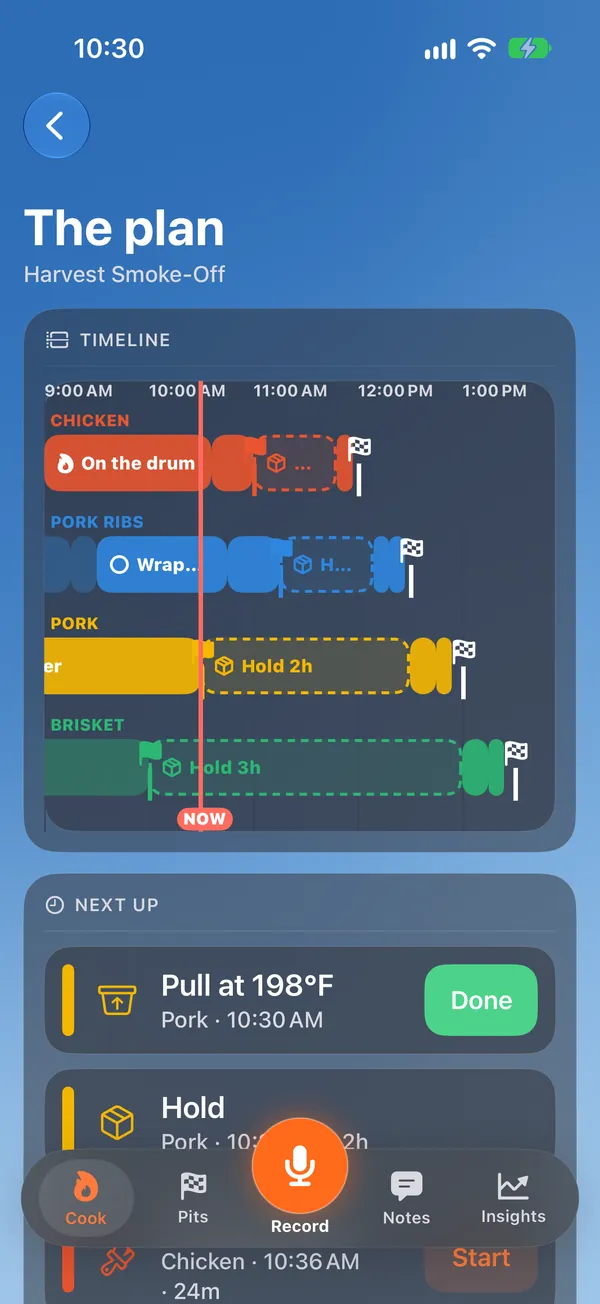
The plan: a timeline with a lane each for chicken, pork ribs, pork and brisket, each ending at its turn-in flag, and a now line

The forecast

Live finish forecasts, with the weather

Every probe reading, from a FireBoard, typed or simply said, re-predicts each meat's finish as a range. Turn-In spots the stall and tells you what each move buys you: wrap now, raise the pit, hold longer.

It reads the forecast for the contest site, so cold, wind and rain on an exposed pit widen the slow end of the range, and a severe-weather alert reaches you. The screen is the sky outside: dawn, rain, night, and embers when a turn-in is close.

Cook Day in the rain: the chicken turned in at 11:57 AM, the pork ribs next at 12:30 PM, and each meat's finish forecast

Notes and Siri

Say it once. The whole team sees it.

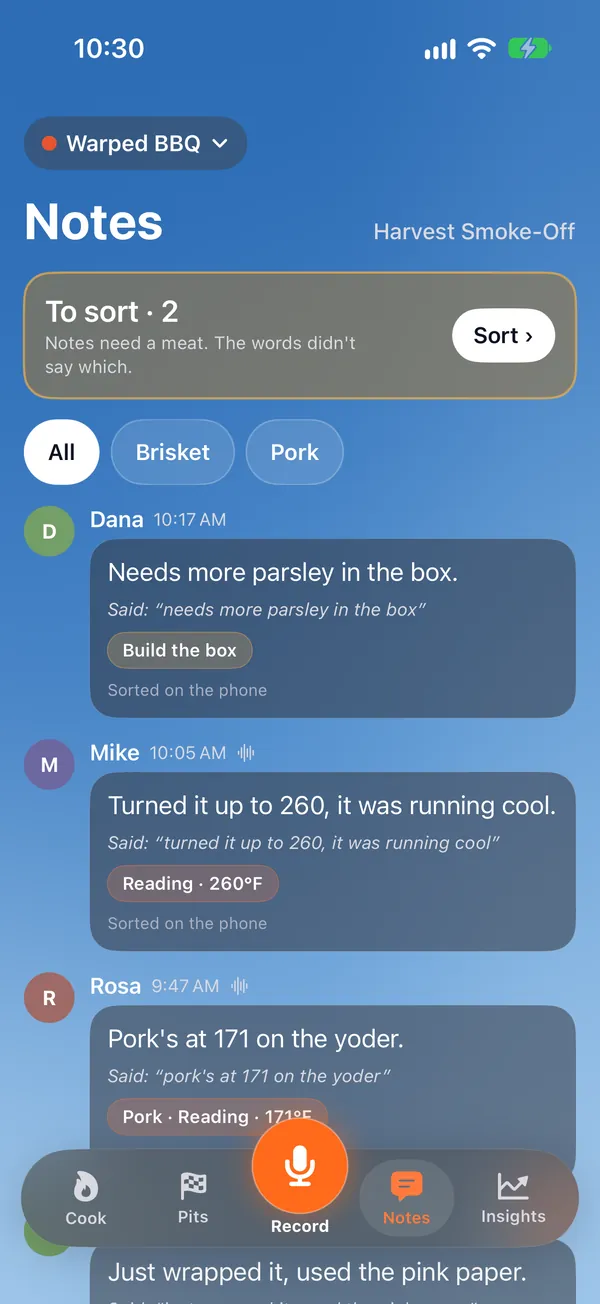
One record button for everybody. Hold it and talk: "turned it up to 260, it was running cool". Your phone writes it down, the note lands in the team's feed, and the reading goes on the right pit and the right meat. Only what the words say gets filed; anything unclear waits in a To sort pile.

Hands covered in rub? Siri does it, from the lock screen or your AirPods:

  • Hey Siri, what's next in Turn-In
  • Turn-In note
  • Turn-In pit 1 temp
  • Turn-In mark ribs wrapped
  • Turn-In push chicken back
  • Undo in Turn-In

Every change is said back, with "Say 'undo' in Turn-In to change it".

The team's notes feed: notes from three teammates, each with what was said and the reading filed from it, and two notes waiting to be sorted

Results

Score sheets from a photo

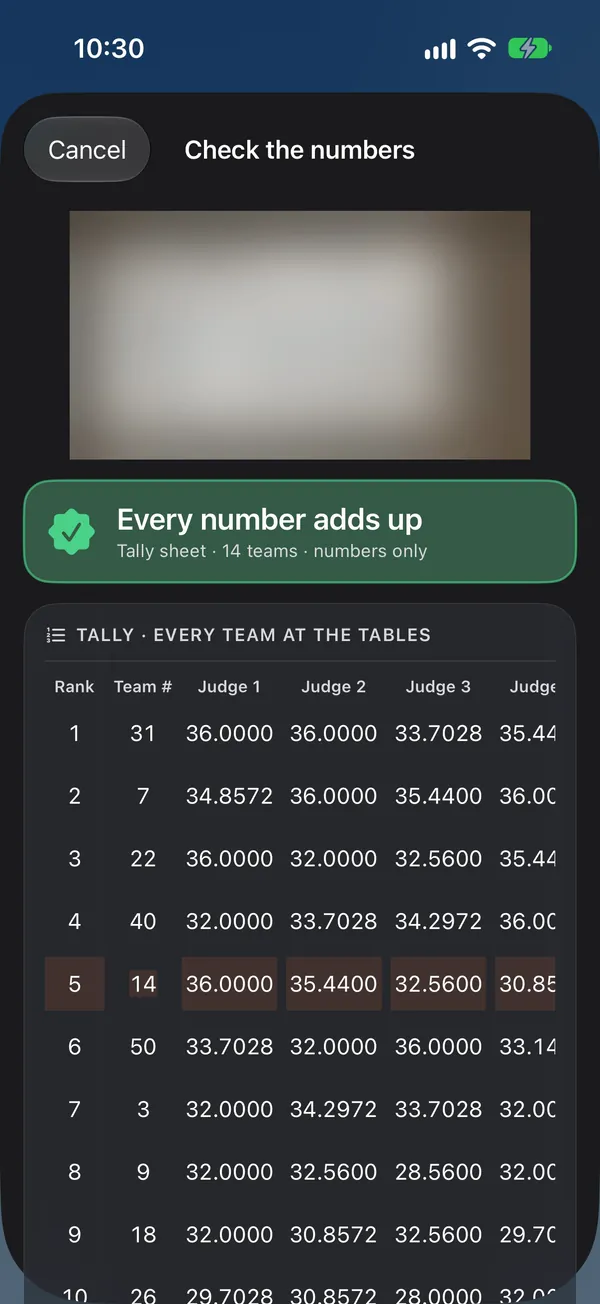
Photograph the tally sheet or a comment card. Turn-In reads it, then does the arithmetic itself, judge by judge, with the body's weights and the dropped low card, and highlights any number that doesn't add up before it goes into your history.

Or tap the scores in with big buttons. Either way, compare any two contests side by side: what changed in the cook against how the scores moved.

Check the numbers: a tally sheet read from a photo, with every number adding up

Debriefs and programs

A program that learns from every contest

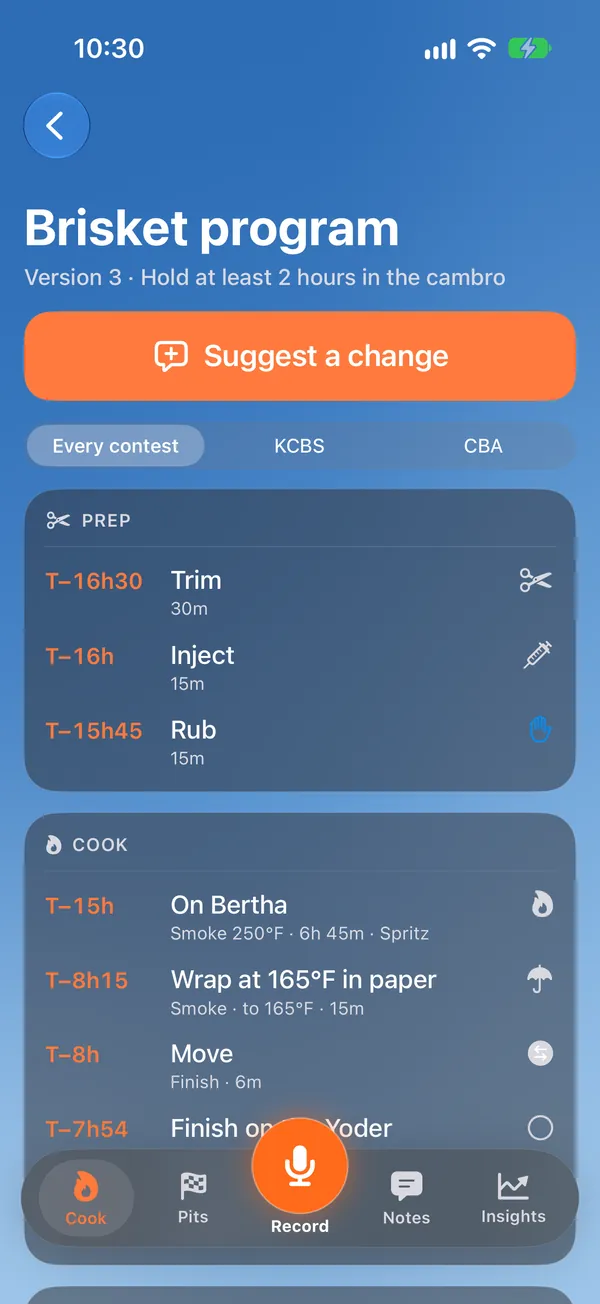
After the turn-ins, a short debrief asks only what it doesn't already know, one card at a time, or out loud. When something changed, it becomes a proposal on the program: add it, try it for two or three contests, or just log it. The captain or the pitmaster decides, and every version is kept.

Start from your own recipe: type it, say it, or photograph the notebook page, and answer a few questions.

A brisket program, version 3: prep and cook steps timed from the turn-in, with Suggest a change

Insights

What actually moves your scores

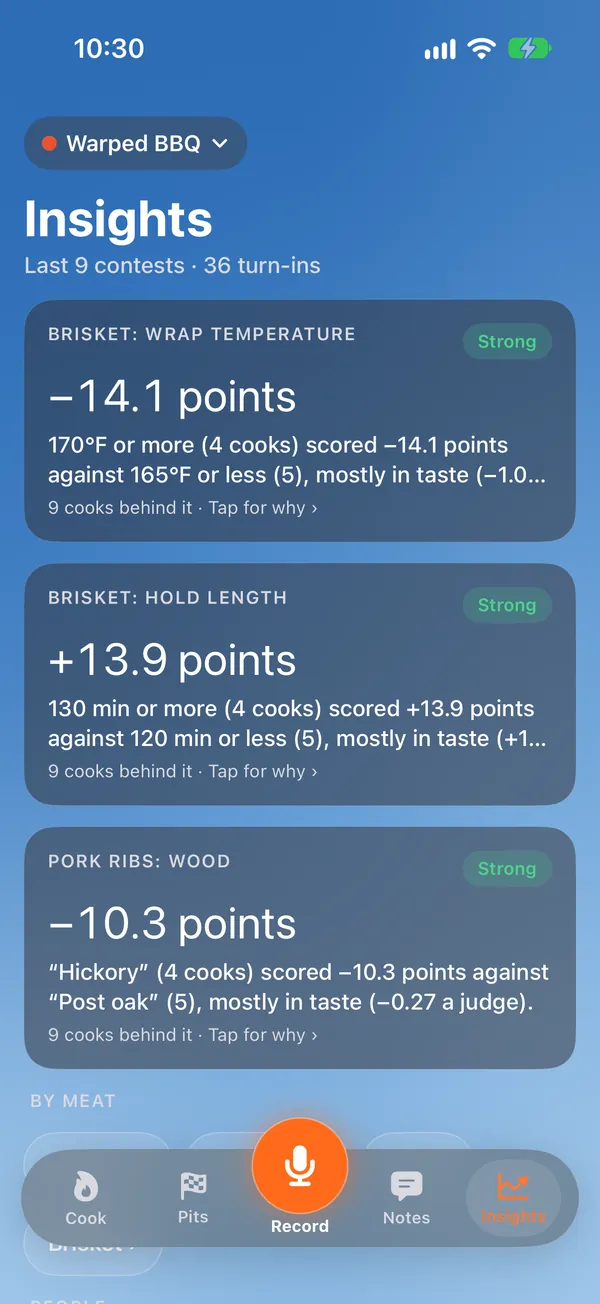
Wrap temperature, hold length, wood, the program version, who cooked it: Turn-In lines up what changed against what scored, and says how sure it is ("strong" takes 8 or more comparable cooks). Judges and tables, with the table's mood taken out. What each contest cost you.

Your numbers are your team's alone: there is no leaderboard and no cross-team benchmark.

Insights over the last 9 contests: brisket wrap temperature, hold length and pork rib wood, each with its effect on the score and how sure the app is

The whole team, in sync

Up to 6 people on the Team plan, each on their own iPhone or iPad, through iCloud. Teammates join free.

An iPad pit wall

Cook Day, the pits and the alerts on one always-on screen by the smokers.

On the lock screen

A Live Activity counts down to the next step and the next turn-in, in the Dynamic Island too.

Works without signal

The plan, Cook Day, alarms and notes work on the phone at a field with no bars; sync and the smart features catch up when there's signal.

Pricing

Planning is always free, and so are your first 2 contests with data.

Free

$0

  • Planning, always
  • 2 contests with data, free, per Apple account (across all your teams)
  • Yours to view and compare forever

Solo

$49.99 / year

  • One pitmaster
  • Unlimited contests
  • Smart notes, the debrief and the results review
  • Score-sheet photos read for you

Team BEST FOR TEAMS

$79.99 / year

  • Everything in Solo
  • Up to 6 people, free for them
  • Everyone's phone in sync
  • Notes, alarms and scores shared

A contest counts once a score, a note, a photo or a running timer goes in, never when it's only planned. Subscriptions are yearly, through your Apple Account, and renew automatically unless cancelled at least 24 hours before the end of the period. A plan belongs to one team. Prices in US dollars; the App Store shows yours. See the terms.

Privacy

Your cook stays your team's

No ads, no tracking, no selling data, and no account of ours to make. Voice notes are written down on your phone and the recording stays with your team. Only what the smart features need goes to our own server: the words of a note, or a recipe or score-sheet photo, which is read and then deleted. The details are in the privacy policy.

Questions?

Answers on teams, sync, Siri, imports and subscriptions are on the support page, or write to admin@warpedtechnologies.io.